


Introduction
If you’ve recently switched your Google Merchant Center from Google CSS to Shoparize Premium CSS, you might notice that your free listings have suddenly been disapproved. This is a common issue caused by how Google handles free listings across Merchants with multiple Merchant Center accounts per domain.
Why This Happens
Google only allows one Merchant Center account per business to publish free listings. If you already have multiple Merchant Centers when performing a CSS switch, Google may treat your original GMC as a secondary account and automatically disapprove its free listings.
The Fix: Create a “Dummy” Merchant Center
To resolve this, a short work around is required. To begin, create a new “dummy” Merchant Center – it is important to note that this new Merchant Center should be associated with Google CSS in order to access the CSS dashboard that allows you to manage your Free Listings.
This Merchant Center will not be used to publish Google Shopping Ads, will not affect your current Merchant Center(s), and will only be used to administrate your Free Listing Settings.
If you already have a Merchant Center that is associated with Google CSS, you can immediately access this dashboard by skipping to Step 3 in the following step-by-step guide.
Step-by-Step Guide
- Create a New Merchant Center
- Sign up for a new Google Merchant Center account under your business.
- Claim & Verify Your Website
- Go to Business Info in the left menu.
- Complete the claim and verification process for your website.
- Switch to Shoparize CSS
- In this new account, navigate to your Settings > Comparison Shopping Services
- Scroll down to Comparison Shopping Services (CSSs) selection
- Choose Shoparize CSS for both Free Listings and Shopping Ads in Europe.
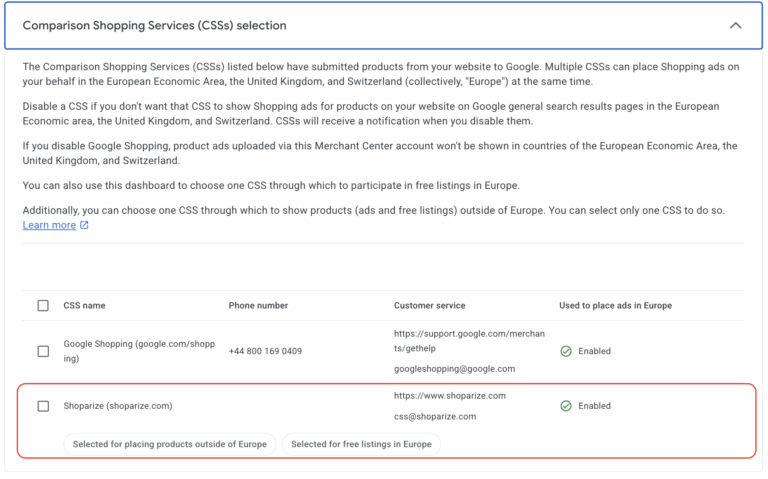
Once done, Google will recognise that those Merchant Center accounts associated with Shoparize CSS are eligible for your Free Listing Ads, and your products will begin to be re-approved.
This re-approval process can take up to 24-48 hours.
If you have any questions, feel free to reach out to our customer success team at partner@shoparize.com
